
Monolith Magnetization Guide
This guide covers magnetizing the Necron Monolith's four corner ball-turrets with the Monolith No-Drill Custom Magnetization Kit, so the Death Ray and Gauss Flux Arc can be swapped on each corner. It uses 3D-printed replacement parts and 4 mm x 2 mm magnets; the GW corner pieces are not drilled.
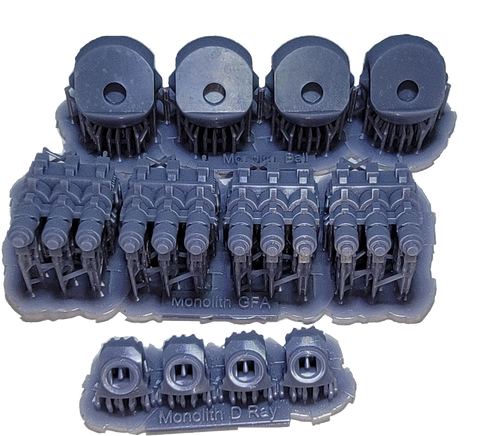
Contents
- What you'll need
- Kit parts and magnets
- Step 1: Prepare the printed parts
- Step 2: Magnetize the Gun Ball (M1)
- Step 3: Magnetize the Death Ray (M2)
- Step 4: Magnetize the Gauss Flux Arc (M3)
- Step 5: Swap and use
- Step 6: Final assembly
What you'll need
- Monolith No-Drill Custom Magnetization Kit: M1 Gun Ball x4, M2 Death Ray x4, M3 Gauss Flux Arc x4, and 12 N52 4 mm x 2 mm disk magnets
- Thin or medium CA super glue
- Magnicators for tracking magnet polarity (base = blue, gun fire = red)
- Clippers for removing supports and trimming, plus files or sandpaper
Kit parts and magnets
Magnets: 12 disk magnets, 4 mm diameter x 2 mm height, N52.
| Code | Name | Per Sprue | Sprue |
|---|---|---|---|
| M1 | Gun Ball | 4 | Monolith Ball |
| M2 | Death Ray | 4 | Monolith D Ray |
| M3 | Gauss Flux Arc | 4 | Monolith GFA |
M1 Gun Ball is the base part the weapons attach to.

Step 1: Prepare the printed parts
Be very careful removing the supports, as you can compromise detail on the underside of a part. Clip the supports off the base first, rather than ripping the part off the supports. Once the supports are off, sand and file the printed parts as needed.
Step 2: Magnetize the Gun Ball (M1)
Insert a 4 mm x 2 mm disk magnet into the hole in the M1 Gun Ball, which is the base part the weapons attach to. Keep track of polarity; we recommend a Magnicator with the blue end (base = blue).

Step 3: Magnetize the Death Ray (M2)
Insert a 4 mm x 2 mm disk magnet into the hole in the M2 Death Ray. Keep track of polarity; use a Magnicator with the red end (gun fire = red). To fit into M2 properly, cut the stem at the base of plastic part 56 in half. Test fit before gluing onto M2. Complete the assembly of each Death Ray barrel using plastic parts 54, 55, and 57.


Step 4: Magnetize the Gauss Flux Arc (M3)
Insert a 4 mm x 2 mm disk magnet into the hole in the M3 Gauss Flux Arc. Keep track of polarity; use a Magnicator with the red end (gun fire = red). Glue the ends of the Gauss Flux Arc, plastic part 49, onto M3.


Step 5: Swap and use
Once the parts are done, the Death Ray and the Gauss Flux Arc each swap onto the Gun Ball, so every corner can change between the two weapons.


Step 6: Final assembly
Insert the Gun Ball into the corner of the Monolith as directed at the end of the GW kit's step 3a. Be careful not to glue the Gun Ball to the corner parts, so it can still pivot up and down. It is easier to hold the Gun Ball with one of the two weapons attached.


